course_notes
OSI : open system interconnections reference model.
- The OSI is a guide to see when troubleshooting.
- It is Not designed to be a detailed description of data on a network. It is only use to generally describe a overview of how data traverses networking systems.
- OSI model is NOT the same as the OSI protocol suite.(The model is more about teaching and design framework; while the protocol suite is about real attempt to implement that framework) .
- There are 7 layers and unique protocol for every layer.
HELPER: to memorize the layers (7 -> 1) use this catch phrase.
“All People Seem To Need Data Processing”
Layer 1: Physical
- This layer is pretty simple, we are only talking about cabling, connectors and, signaling.
- We don’t have protocols in this layer because testing is easy.
- Most of the tests that we will use in the physical layer are Running loopback tests, test/replace cables, swap adapter cards…
- Most of the Fixing will be on the cabling side, punch-downs, etc…
Layer 2: Data Link
- The foundation of communication between two devices.
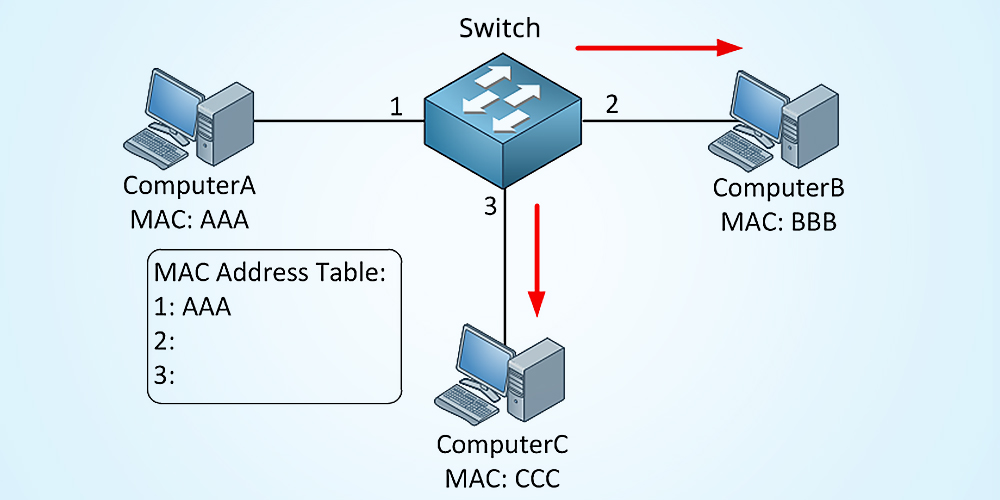
- Here we talk about MAC address (Media Access Control) on Ethernet. also known as the DLC (Data Link Control) layer. which is commonly associated with the network cards found in our devices (Ethernet/Wireless adapters).
- The MAC address refers to the address of the network adapter of the device.
- In this layer we know where to forward traffic based on the destination MAC address. because of this, we also refer this layer as the”switching” layer
- In this layer we are creating Frames.
- We talk in this layer about Extended Unique Identifier(EUI-48, EUI-64)
Layer 3: Network
- Also known as the “routing” layer
- In this layer, the router determine how to forward traffic using IP address(Internet Protocol).
- We fragment frames into multipole pieces (the frame sizes may differ depending on the network weather it is local or not and depends on the traffic also)
- In this layer we are creating packets.
- Any problem relating to PIs, subnet mass, or rerouting. we are talking about the Network layer.
Layer 4: Transport
- In this layer we talk about the ability to transport information from one device to another.
- Also known as the “post office” layer.
- The protocols that are often used in this layer are :
- TCP segment (Transmission Control Protocol)
- UDP datagram (User datagram Protocol)
- Those protocols are responsible for getting all the information within our IP packets from one device to the other.
- In many cases the data transfer require to divide the large data into many pieces.
Layer 5: Session
- Before we are able to send data from a device to another we need to create something called a session
- A session provide communication management between point A and point B.
- Anything “starting / stopping / restarting” a session is related to this layer
- Anything using “Control protocols / tunneling protocols” is related to this layer
Layer 6: Presentation
- in this layer we put all information gathered into a format that the user can see
- This is done by using:
- Character encoding
- Application encryption / decryption
- It’s often combined and discussed with the Application layer (layer 7). Thus using Application encryption like SSL/TLS (Used in HTTPS for security)
- This layer is an operation that happens prior to seeing this data on our screen
Layer 7: Application
- The layer we see as a user
- HTTP / HTTPS , FTP, DNS, POP3